If you Googled "Rork vs Replit for iOS" in 2026, you're not the first founder to ask. Both tools promise to turn a text prompt into a working mobile app. They go about it very differently. This guide is the side-by-side, on-device answer.
How We Got Here
Mobile development used to be the slow lane. Long compile times, Xcode quirks, months from idea to MVP. React Native made it faster by letting JavaScript developers ship to iOS and Android from one codebase. LLM-powered tools like Cursor cut that cycle further by helping engineers write and debug at speed.
The current wave — Rork, Lovable, Replit, Base44 — drops the floor entirely. You don't need to know what a framework is. You describe an app, the model builds it, you ship it. That's why solo founders are launching niche apps in days and, in some cases, hitting real revenue within weeks.
For monetization, iOS is the obvious starting line. The user base is engaged, willing to pay for subscriptions, and tuned for in-app purchases. Which is exactly why the "best AI builder for iPhone" question matters.
This guide is iOS-only. Web apps and Android are out of scope. The question is: which of these tools actually ships the best iPhone app with the least friction?
The Core Philosophy: Native Swift vs. React Native
The biggest difference is what happens under the hood.
- Rork Max is built for the Apple ecosystem. It generates real native Swift apps, with deep access to Apple-only capabilities: widgets, Live Activities, Siri intents, Apple Watch, AR, Dynamic Island, HealthKit, HomeKit, Vision Pro, iMessage. It's iOS-first by design. (Rork also has a Pro tier built on Expo / React Native for builders who want one codebase across iOS, Android, and web — but Max is the Swift-first iOS product.)
- Replit takes the cross-platform route through React Native and Expo. One codebase targets iOS, Android, and web. Faster to reach more devices, less optimized for any one of them. The tradeoff is reach over polish.
If your priority is shipping an iPhone app that feels deeply integrated into iOS, those are not equivalent choices.
The Test: Building a Meal Scanner App
We gave both platforms the same one-shot prompt:
"A minimalist, modern iOS meal scanner app where the user snaps a photo of their plate, the app recognizes the food, estimates quantity, and instantly generates a macros breakdown (calories, protein, carbs, fats) while also naming the meal and listing detected ingredients in a clean 'Meals' timeline. Each meal photo is auto-converted into a playful, high-quality sticker that becomes a visual tile in the user's personal meal gallery, with the overall UI inspired by Airbnb's current design language: lots of white space, soft rounded cards, subtle shadows, and a few modern skeuomorphic touches like 3D-style food stickers and tactile buttons that feel gently pressable rather than flat."
We scored on four things: prompt fidelity, UI and asset quality, the building experience, and how hard it was to actually get the app onto a phone.
Rork Max
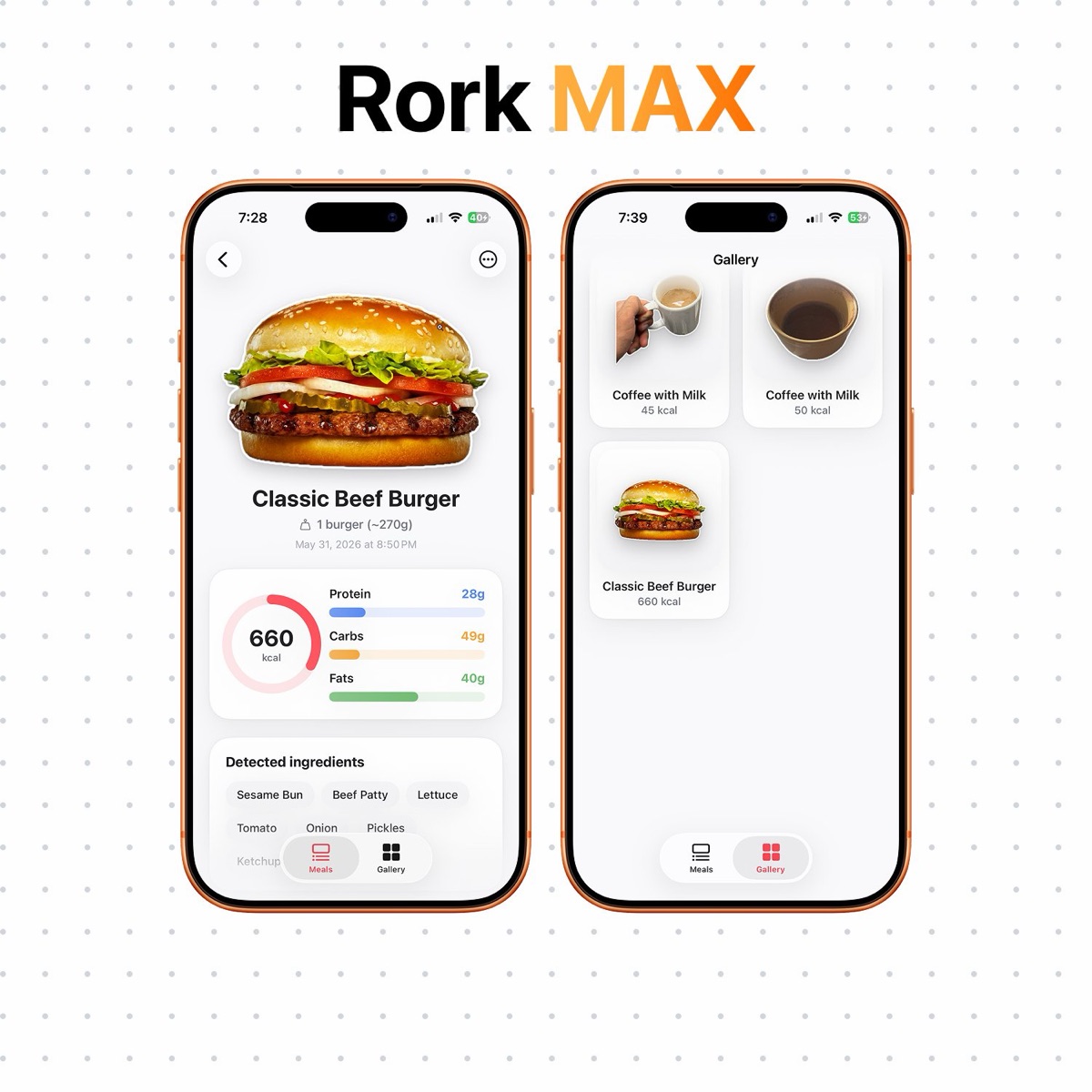
Closest thing to a true one-shot build we've seen. It followed the visual direction with surprising accuracy, the sticker animation effect was implemented cleanly, and the scanner pipeline worked end-to-end — analyze the meal, identify ingredients, break down the macros. All from the original prompt.
Because Replit needed more than ten prompts just to debug its core experience, we gave Rork Max one extra prompt to push the polish further with Metal-style shaders and tighter skeuomorphic touches. Two prompts, under ten minutes, real app running on the phone.
Replit
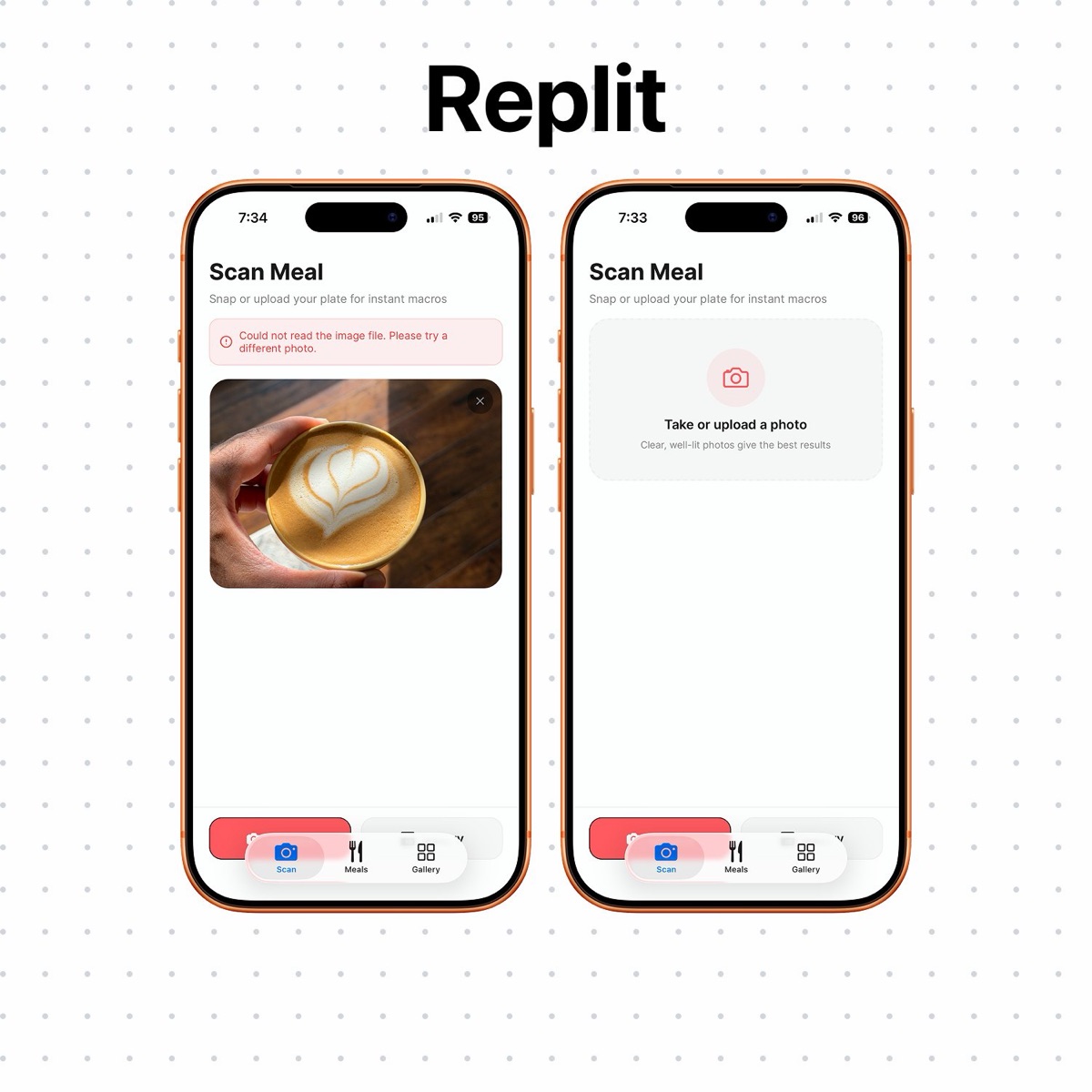
Functional, but it felt like an MVP, not a finished iPhone app. The UI was practical without the visual precision the prompt asked for, and the overall feel leaned web-style rather than native. Testing was the harder problem. The scanner appeared to work in Replit's web preview, but we couldn't get it running reliably on a physical device through Expo Go — uploaded images repeatedly returned a "Could not read the image file" error.
The takeaway
Both tools build something. Only one of them ships something you'd be proud to install on your phone in under ten minutes. For an iOS-first prompt, Rork Max was faster, more visually aligned, and easier to move from idea to a real app on a real device.
Apps built and shipped with Rork — polished, native-feeling, on real devices.
On-Device Testing: The "Real App" Factor
This is where the experience diverges sharply.
- Rork Max installs your app directly onto your iPhone via the Rork Companion app as a self-contained native build. Once installed, it runs like any other app on your phone — no dev server, no laptop required.
- Replit uses React Native and Expo, so testing typically runs through Expo Go and a QR scan. Expo Go is convenient for early iteration, but it's tied to a running Metro bundler. If the Metro server goes down, your laptop sleeps, or your dev session times out, the app stops working on your phone. Anything beyond the standard Expo runtime (custom native modules, certain camera or ML features, push notifications) needs a custom development build on top.
The practical difference: with Rork Max, once it's on your phone, it's yours. With Replit's default flow, you're holding a preview that depends on a live dev session somewhere else.
Handling the Tedious Stuff
Building the app is the fun part. Icons, screenshots, metadata, privacy policies, and App Store listing requirements are where first-time founders quietly give up.
Both tools handle the first hurdle. App icon generation is built into both Rork and Replit. That's table stakes in 2026.
The gap opens after the icon.
- Rork automates most of the App Store submission stack. Beyond icons, it can be prompted to generate in-app assets and images directly, and on publish it generates App Store screenshots, descriptions, and even a mock App Review pass designed to flag likely rejection reasons before you submit. Bundle identifiers, provisioning, and submission metadata are handled automatically.
- Replit handles the technical publishing pipeline — Apple certificates, cloud builds, security scan, signing, and submission through its embedded Expo flow. What it does not auto-generate is the App Store Connect metadata: screenshots, descriptions, keywords, and privacy disclosures are still on you. In Replit's own launch demo, the presenter described this metadata step as "the hardest part" of the process and noted his first app was rejected multiple times for missing screenshots and incomplete privacy information.
We didn't run a full App Store submission on either platform for this test, so the verdict here is based on documented capabilities, not first-hand publish data. The pattern is clear though: Rork takes more of the App Store Connect work off your hands than Replit does.
Deployment: Streamlined vs. Guided
- Rork Max is built around a streamlined publishing experience. One-click iPhone installs, two clicks to App Store for TestFlight and submission.
- Replit removes the need for local Xcode by using an embedded Expo publishing flow. It configures Apple certificates, builds in the cloud, and submits to App Store Connect for TestFlight. The process is more guided and step-based, and you still finish the App Store listing in App Store Connect before going public.
Both get you there. Rork Max gets you there with fewer clicks.
The Verdict: Which Is the Better iOS App Builder?
For a non-coder who wants the most polished iPhone app with the least friction, Rork Max is the stronger choice.
It's built specifically around the Apple ecosystem, with native Swift support across iPhone, iPad, Apple Watch, Apple TV, Vision Pro, and iMessage. It emphasizes the deeper iOS capabilities — AR, widgets, Live Activities, Siri intents, Dynamic Island, HealthKit, HomeKit, and other Apple-native APIs — that the cross-platform tools either skip or wrap awkwardly.
Rork Max feels less like a general code generator and more like an Apple-first product builder. Idea to native app, tested on real iOS, submitted to TestFlight or the App Store with a fraction of the traditional setup. The final App Store Connect steps still belong to you, but the build, signing, screenshots, descriptions, and submission friction is mostly gone.
Replit is a strong choice for builders who want flexibility and cross-platform reach. One codebase for iOS, Android, and web, with App Store submission supported. If your priority is breadth, Replit is the right shape.
But for iOS-first, Rork Max has the edge. Replit is broader. Rork Max is more focused. For founders building specifically for the iPhone, that focus is the difference between an MVP and an app you'd ship.
What to Do This Week
- If you're iOS-first and want native Swift: open Rork Max, ship a screen by Friday, install on your phone via the Rork Companion app.
- If you need iOS + Android + web from one codebase: try Rork Pro (Expo / React Native) — same Rork ecosystem, same submission flow, cross-platform output. Or try Replit's mobile workflow if you're already in that environment.
- Either way, write a one-paragraph prompt before you open anything. Specificity in, polish out.